The easiest way to send print-ready artwork is to design on our template. It already marks the size, the cut line, the bleed and the four mounting holes, so all you add is your design.
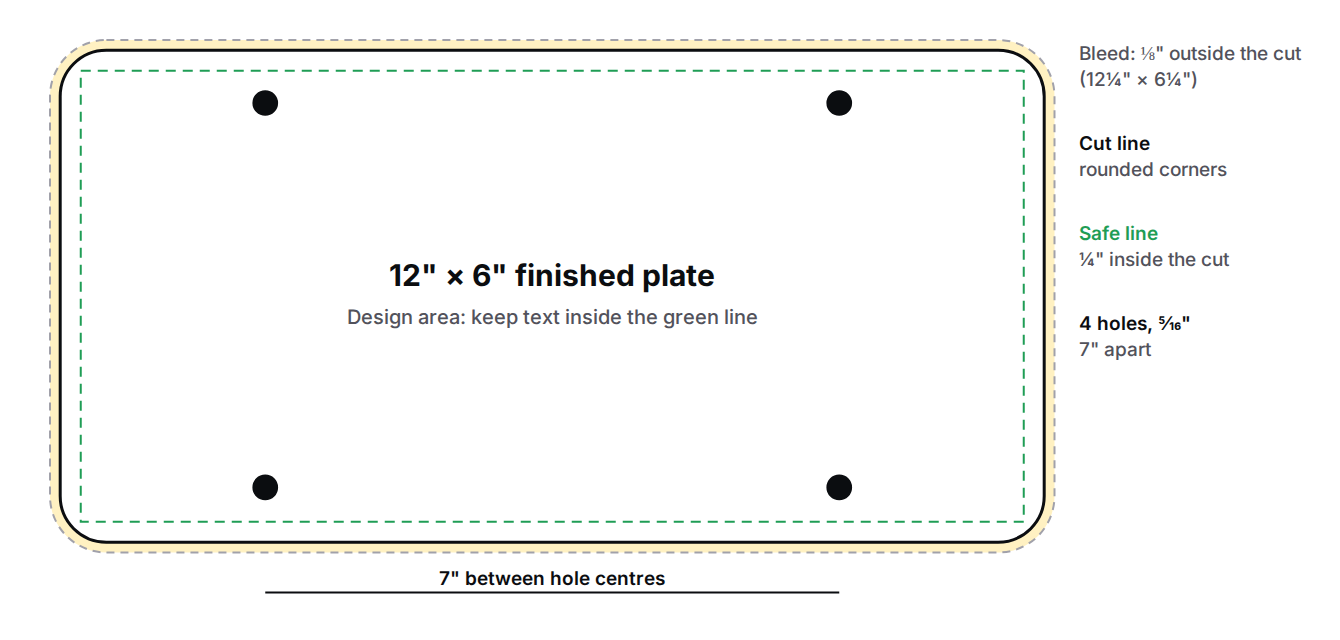
Size and layout
Rounded corners, cut to this line.
Run your background past the cut on every side, to 12¼” × 6¼”, so no white edge shows after trimming.
7″ apart, about ⅝” from the top and bottom edges. Anything printed there is punched out.
Keep names, numbers and logos ¼” inside the cut and clear of the holes.
File types
Export from the template at full size. Fonts and logos stay sharp.
JPG / JPEG
At least 300 pixels per inch at full size: 3,675 × 1,875 pixels for the whole template.
Vector (AI, EPS, SVG)
Ideal for logos and type. Convert text to outlines, or include your fonts.
Three ways to get your artwork to us
Upload when you order
Choose Upload your design in step 3. We check the file as it uploads and tell you straight away if something needs fixing, such as a low-resolution image.
Order and uploadStart from a template
Pick a ready-made layout and add your name, logo and number in the plate designer. No design software needed.
Browse templatesHave us design it — $75
Send your logo and what the plate should say. We design it and email you a proof. You can also email files to orders@didrtp.com with your order number.
Order with designBefore you upload, check
- Dealership name, phone number and website are spelled correctly.
- Nothing important sits over a mounting hole or within ¼” of the edge.
- Your background runs all the way to the bleed line.
- Photos and logos are at least 300 pixels per inch at full size.
- Text is outlined, or the fonts are included in your file.